

Table of Contents
YouTube video download is a popular search topic for people who want to watch videos without an internet connection, save their own content, or reduce mobile-data usage. In India and across Asia, where connectivity and data costs can vary significantly by location, offline viewing can be especially useful.
However, there is an important distinction between using YouTube’s built-in download features and using third-party services to extract video files. In 2026, the safest approach is to use YouTube’s officially supported options or download videos that you own or have permission to use. YouTube’s current Help documentation confirms that certain videos can be downloaded for offline viewing through its service, while videos uploaded by other users generally cannot be downloaded as standalone files through YouTube.
This guide explains how YouTube video downloads work, what options are available, how they differ across devices, and what users should know before downloading content.
Understanding the YouTube Video Download Process
The phrase YouTube video download can refer to several different things.
A user might mean:
- Offline viewing inside the YouTube app
- Downloading a video they personally uploaded
- Saving authorized or freely licensed content
- Downloading a video as a normal MP4 file
- Using a third-party downloader website or application
These methods are not equivalent.
YouTube’s official offline feature is designed primarily for viewing content without an active internet connection. It does not necessarily create a normal video file that you can freely move between applications.
By contrast, YouTube provides options for creators to download their own uploaded videos to a device. YouTube currently states that creators can download their uploaded videos as MP4 files, generally in 720p or 360p depending on the video’s size.
Why This Difference Matters
A common mistake is assuming that because a video can be watched offline, it can also be extracted as a permanent MP4 file.
That is not necessarily the case.
Offline access and file ownership are two different concepts.
Understanding this difference helps users avoid copyright problems, unreliable downloader websites, malware, and misleading download tools.
Ways to Watch YouTube Videos Without an Internet Connection
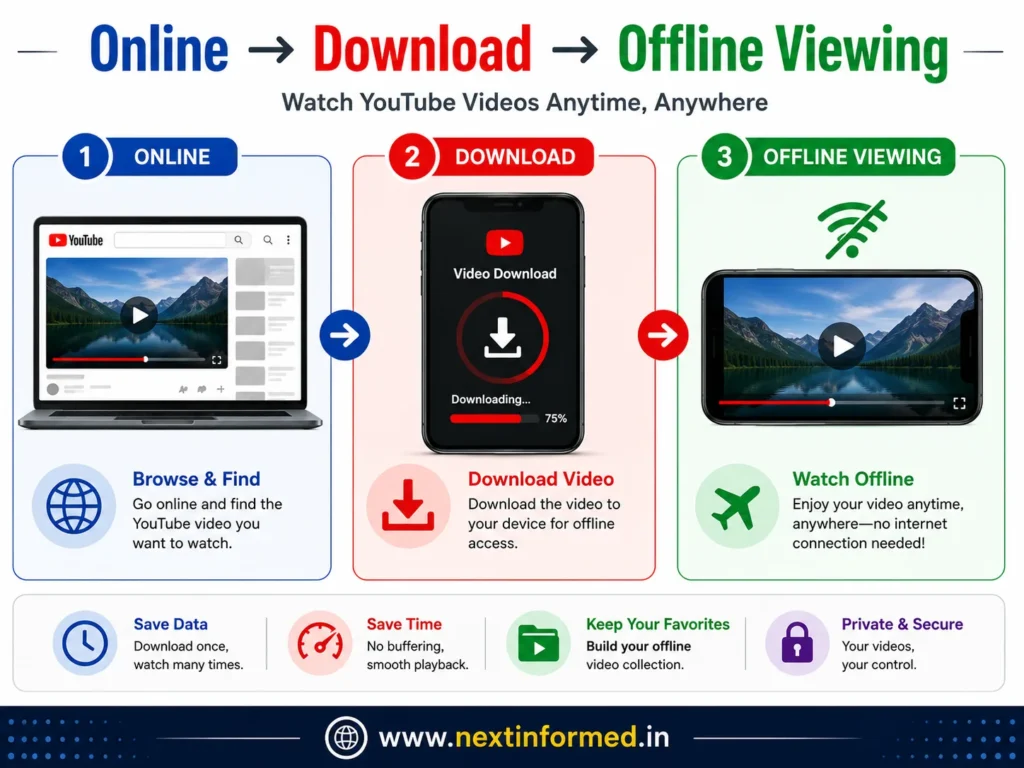
For ordinary viewers, the simplest approach is to use YouTube’s own download functionality where it is available.
Step 1: Open the YouTube Video
Open the official YouTube app or website and find the video you want to watch offline.
Step 2: Check Whether Offline Saving Is Available
On supported videos, select Download below the video.
On mobile devices, YouTube provides the option directly from the video page when offline downloading is available.
Step 3: Choose Your Download Quality
Depending on the device, account, video, and availability, YouTube may provide different quality options.
Higher quality generally means:
- Better image quality
- More storage consumption
- Greater download size
- Potentially longer download times
For users in India using mobile data, selecting an appropriate quality can make a noticeable difference.
Step 4: Find the Downloaded Video
Downloaded videos can be accessed through YouTube’s Downloads section.
The content remains associated with the YouTube account and service rather than becoming a freely transferable video file.
YouTube Video Download on Android
Android is particularly important for the Indian market because of the enormous number of Android smartphones in use.
If YouTube’s download feature is available for a particular video, the general process is:
- Open the YouTube app.
- Sign in to your account.
- Open the desired video.
- Tap Download.
- Select the available quality.
- Open You → Downloads to watch it later.
YouTube notes that downloaded videos may need periodic internet connectivity so the service can verify their continued availability. In some locations, offline playback may be limited to 48 hours, while certain content can remain available for longer periods.
What Android Users Should Consider
Before downloading large amounts of video, check:
- Available phone storage
- Wi-Fi availability
- Download quality
- Mobile-data settings
- SD-card capacity
- YouTube account status
If you regularly download videos, using Wi-Fi can help avoid unexpectedly consuming a large mobile-data allowance.
Downloading YouTube Content on iPhone or iPad
The process on iPhone and iPad is similarly straightforward when YouTube’s offline feature is available.
Basic Process
- Open the YouTube app.
- Sign in.
- Open the video.
- Tap Download.
- Select an available quality.
- Access the video later from the Downloads area.
YouTube’s current documentation supports offline downloads through the YouTube app for eligible users and content.
One important limitation is that an official offline download should not be confused with exporting the video into your iPhone’s Photos app as a normal MP4.
YouTube Video Download on a Computer
YouTube Premium users can download supported videos for offline viewing on a computer through supported browsers.
According to current YouTube Help documentation, Premium users can use YouTube on Chrome, Edge, Firefox, and Opera to download supported videos for offline viewing.
General Process
- Log in to the YouTube account linked to your Premium membership.
- Open YouTube.
- Navigate to the video.
- Select Download below the video.
- Open the Downloads section to access it later.
The downloaded content remains within YouTube’s supported offline experience.
Is It Possible to Save Your Own YouTube Uploads?
Yes.
This is one of the clearest legitimate use cases for a YouTube video download.
If you uploaded a video yourself, YouTube provides a way to save it to your device.
On YouTube Studio
A creator can generally:
- Sign in to YouTube Studio.
- Open Content.
- Select the video.
- Open the video menu.
- Select Download or the relevant save-to-device option.
YouTube currently states that creators can download their uploaded videos as MP4 files, with the available resolution depending on the video.
Why Creators Use This Feature
Downloading your own videos can be useful for:
- Creating backups
- Re-editing old videos
- Repurposing content
- Moving content between devices
- Archiving important projects
- Keeping an offline copy
For creators, maintaining an independent backup is a smart content-management practice rather than relying exclusively on a social platform.
Can You Download Someone Else’s YouTube Video?
This is where things become more complicated.
YouTube’s current Help documentation explicitly says that users cannot download other users’ YouTube videos through the creator-download feature. YouTube instead points viewers toward its official offline viewing options.
There can be exceptions where content is specifically made available for downloading or where applicable law or permission allows another use.
For example, a creator may provide a downloadable version of their work through an authorized website or licensing arrangement.
The Best Rule to Follow
Before saving someone else’s video as a file, ask:
Do I have permission or an official download option for this content?
If the answer is no, don’t assume that the availability of a third-party downloader makes the download authorized.
YouTube Premium vs. Third-Party Downloaders
The internet contains thousands of websites and applications claiming to offer instant YouTube downloads.
They may promise:
- MP4 downloads
- 4K video
- MP3 conversion
- No registration
- Fast downloads
- Mobile downloads
But convenience does not automatically mean safety or authorization.
Official YouTube Downloads
Advantages
- Officially supported
- Integrated with YouTube
- Lower risk of malicious downloads
- Designed for offline viewing
- Account-based access
- Quality settings are integrated into the service
Limitations
- Not every video is available
- Downloads are tied to YouTube’s offline system
- You may need Premium for some content or locations
- Downloaded content is not necessarily a normal MP4 file
Third-Party Downloading Websites
Third-party tools can introduce additional risks.
Potential problems include:
- Aggressive advertising
- Fake download buttons
- Malicious files
- Browser redirects
- Tracking
- Poor-quality output
- Copyright concerns
- Changing availability
For that reason, users should be particularly careful before installing an unknown downloader application or browser extension.
YouTube Video Download and Copyright: What You Need to Know
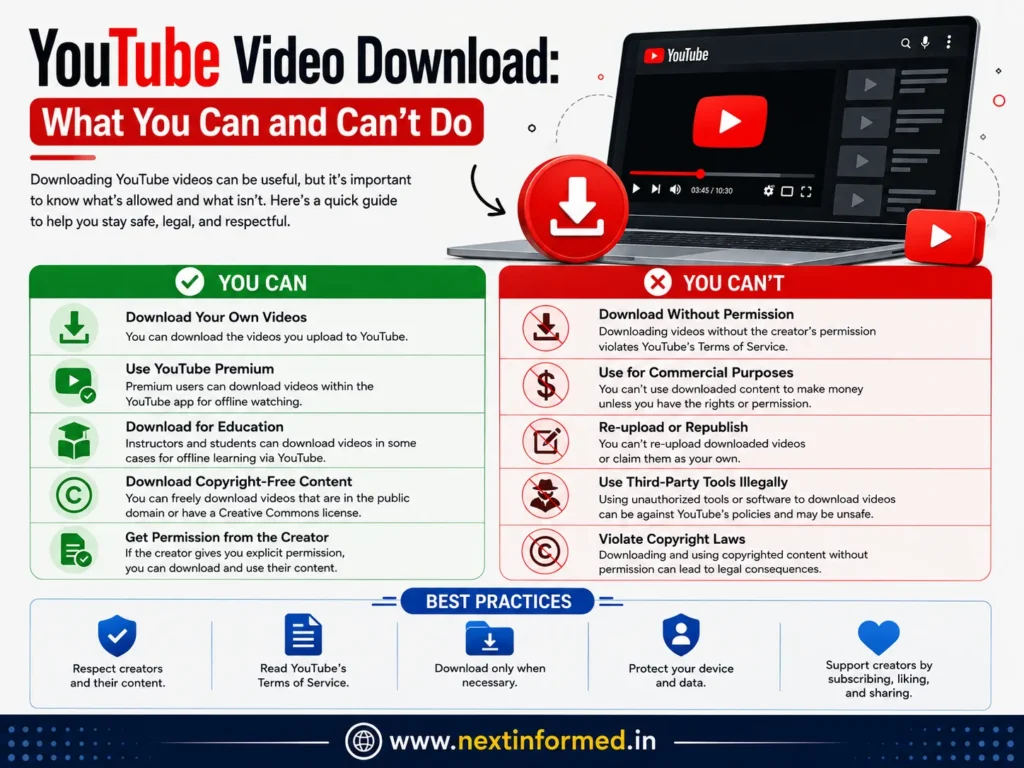
Copyright is one of the most important parts of the YouTube download discussion.
A video being publicly visible does not automatically mean that everyone has the right to copy, redistribute, edit, or commercially reuse it.
YouTube’s Terms of Service restrict downloading and other uses of content except where the service expressly authorizes it, where permission has been obtained, or where applicable law permits the use.
Read More : Best Instagram Video Downloader Tools in 2026 (Free & HD)
Safe Situations
Downloading is generally much easier to justify when:
- You created the video yourself.
- The creator explicitly gave you permission.
- The content is provided under a license that permits downloading and reuse.
- You are using YouTube’s official offline feature.
- Applicable law gives you a relevant right.
Risky Situations
Be cautious about:
- Re-uploading someone else’s video
- Removing watermarks and branding
- Selling downloaded videos
- Using copyrighted clips commercially without authorization
- Downloading copyrighted music and redistributing it
- Building a content library from videos you do not own
The safest strategy is to separate offline viewing from content redistribution.
How to Choose the Right Download Quality
Video quality should match your actual purpose.
360p
Suitable for:
- Basic viewing
- Smaller screens
- Limited storage
- Very restricted data situations
480p
A practical middle ground for many smartphones.
720p HD
A strong choice for general smartphone and tablet viewing.
It provides noticeably better detail without the storage requirements of very high resolutions.
1080p and Higher
Useful when:
- You have sufficient storage
- You have a large screen
- Image quality matters
- Your connection can handle the download efficiently
Important: Higher resolution is not automatically better if your phone has limited storage or your primary goal is simply watching a lecture while traveling.
Saving YouTube Downloads to an SD Card
For compatible Android devices, YouTube supports saving certain downloads directly to an SD card.
YouTube’s current documentation says users can enable SD-card storage under Settings → Background & downloads → Use SD card, where the feature is supported.
This can be particularly useful in markets where users commonly use phones with expandable storage.
One Important Limitation
YouTube says you cannot simply move an existing download between internal storage and an SD card.
Instead, you need to delete the existing download, change the storage setting, and download the video again.
A Practical User Experience Example
Imagine a student in India traveling by train from Delhi to another city.
The student has several hours of travel ahead and expects inconsistent mobile connectivity.
Instead of depending on streaming throughout the journey, they can:
- Connect to reliable Wi-Fi before leaving.
- Open the required educational videos.
- Use YouTube’s supported download feature.
- Select a sensible quality such as 480p or 720p.
- Confirm that the videos appear under Downloads.
- Watch them during the journey without continuously streaming.
This approach is often more reliable than attempting to find a random website that converts YouTube links into MP4 files.
The important distinction is that the student is using YouTube’s supported offline functionality, rather than attempting to extract and redistribute the original video.
Common YouTube Download Problems and Solutions
The Download Button Is Missing
Possible reasons include:
- The video is not available for offline viewing.
- Your location has different availability.
- The account does not have the required membership.
- The content has restrictions.
- YouTube has changed the availability of the feature.
YouTube confirms that some videos are unavailable for offline playback and that Premium requirements can vary by location and content.
The Download Is Taking Too Long
Try:
- Switching to stable Wi-Fi
- Choosing a lower resolution
- Checking available storage
- Avoiding simultaneous large downloads
- Restarting the download if the connection was interrupted
The Downloaded Video Disappeared
Offline downloads are not permanent ownership of the underlying content.
YouTube may require periodic reconnection to verify availability. If a video becomes unavailable for offline playback, it may be removed during synchronization.
Your Phone Is Running Out of Storage
Reduce download quality or remove videos you have already watched.
High-resolution downloads can consume substantially more storage than standard-definition versions.
Best Practices for YouTube Video Downloads in 2026
For most users, the following approach provides the best balance of convenience, safety, and compliance.
- Use YouTube’s official download feature whenever possible.
- Download your own videos through YouTube Studio when you need an actual file.
- Use Wi-Fi for large downloads when practical.
- Choose video quality according to your device and storage.
- Keep enough free storage on your phone.
- Do not assume that publicly available videos are free to redistribute.
- Avoid suspicious downloader websites and unknown applications.
- Check licensing and permission before reusing another creator’s content.
- Keep independent backups of important videos you own.
- Do not provide your Google or YouTube password to a third-party downloader.
Frequently Asked Questions (FAQ)
Is YouTube video download legal?
It depends on what you are downloading and how you use it. YouTube officially supports offline downloads for eligible content, and creators can download their own uploaded videos. Downloading or redistributing someone else’s copyrighted content may require permission or another legal basis.
Can I download YouTube videos without YouTube Premium?
In some countries and for some videos, YouTube provides offline downloads without requiring Premium. However, availability varies by location and content. In India, some videos can be downloaded directly, while certain content requires YouTube Premium.
Can I download my own YouTube videos?
Yes. YouTube provides creators with tools to download videos they have uploaded, including through YouTube Studio. YouTube currently indicates that downloaded creator videos may be provided as MP4 files in available resolutions such as 720p or 360p, depending on the video.
Can I save YouTube videos directly to an SD card?
Yes, where the feature is supported. YouTube allows compatible users to configure an SD card as the storage location for eligible offline downloads.
Where are YouTube offline downloads stored?
Official YouTube offline downloads are managed through YouTube’s Downloads section rather than functioning like ordinary video files that can necessarily be opened in any media player.
Why can’t I download a particular YouTube video?
The video may not support offline viewing, or your location, account, content restrictions, or membership status may affect availability. YouTube states that some videos are unavailable for offline playback.
Can I download YouTube videos on a computer?
Yes, YouTube Premium supports offline downloads on computers through supported browsers including Chrome, Edge, Firefox, and Opera.
Is it safe to use YouTube downloader websites?
Not necessarily. Third-party download websites can expose users to misleading buttons, redirects, unwanted software, tracking, and other security risks. The safer option is to use YouTube’s official functionality or an authorized download source.
Final Verdict: What Is the Best YouTube Video Download Method?
The best method depends on what you actually need.
If your goal is simply watching YouTube videos without an internet connection, use YouTube’s official offline-download feature when it is available.
If you need a permanent video file, the clearest official option is downloading content that you uploaded yourself through YouTube Studio.
If you want to download another creator’s video, first check whether the creator has explicitly provided a legitimate download option or permission.
For Indian users—and increasingly for audiences across Asia, Europe, the United States, and other markets—the most practical 2026 approach is therefore not simply finding the fastest YouTube downloader. It is choosing a method that balances offline convenience, device storage, video quality, security, copyright, and the creator’s rights.
That distinction makes a YouTube video download strategy safer, more sustainable, and much less likely to create problems later.
Read More: hdhub4u – Stream Latest Movie Downloads and Series Easily